View all projects in the workspace
Last updated: July 3, 2026
If you can't find a project in your sidebar, it's likely because of how the Projects view is filtered by default.
Why some projects don't show up in your sidebar
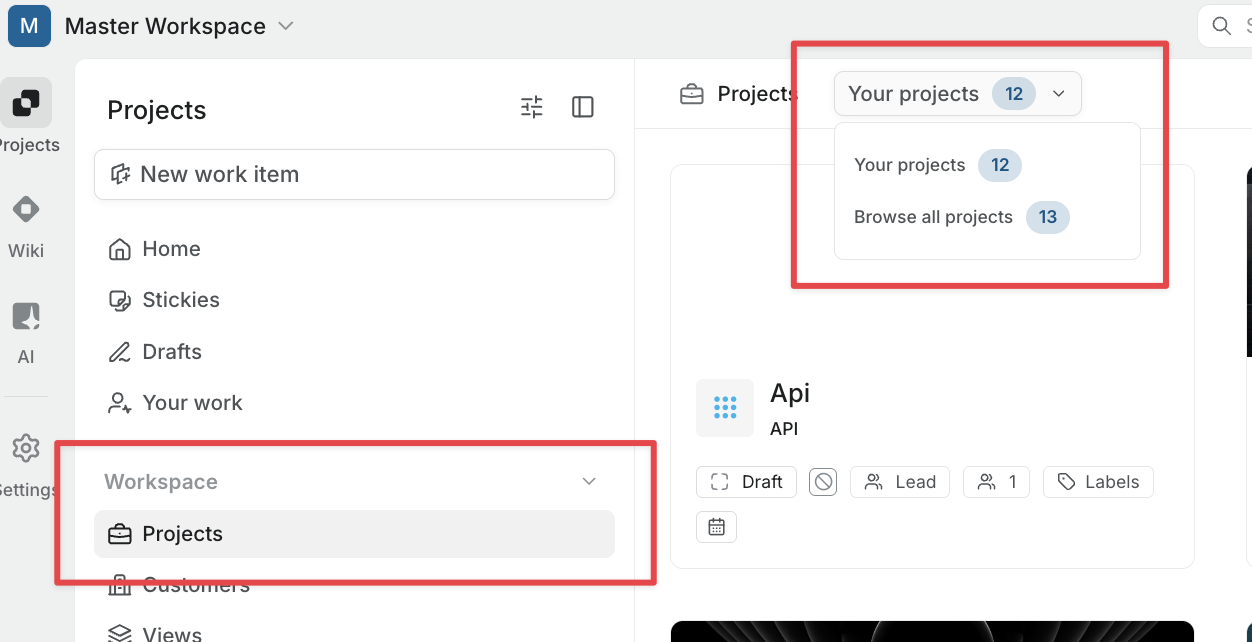
When you open Projects from the sidebar, it defaults to Your projects. This view only shows projects you're already a member of. Projects you haven't joined yet won't appear here, even if they're public.
How to view all projects
Click the Your projects dropdown at the top of the Projects page and switch to Browse all projects. This shows every public project in the workspace, along with any private projects you're a member of.
Private projects
Only Workspace Owners and Admins can view and join private projects. Workspace Members and Guests can join private projects through an invitation.
If a private project still isn't showing up under Browse all projects, you haven't been added to it.